How to Get More Saves on Instagram in 2026

To get more saves on Instagram in 2026, create content people expect to use again. Checklists, tutorials, templates, comparison posts, local guides, step-by-step carousels, and practical reference graphics usually give users a clear reason to tap the save icon. Your post should solve a specific problem, make the solution easy to revisit, and include a natural call to action such as "Save this for later."
For creators, local businesses, coaches, online stores, and service providers across the United States, saves can reveal something deeper than quick attention: future intent. A person may save a restaurant guide for the weekend, a product comparison before buying, or a tutorial before starting a project. NewFollowers recommends treating saves as part of a broader Instagram growth strategy rather than chasing surface-level engagement alone.
What Are Instagram Saves?
An Instagram save happens when someone taps the bookmark icon beneath a feed post or Reel so they can revisit it later. Saved content is private to the user, and creators generally see the total number of saves through Instagram Insights rather than the identities of the people who saved it.
A like often means "I enjoyed this." A save usually means "I may need this again." That distinction makes saves especially useful when evaluating educational, inspirational, commercial, or decision-support content.
People save content that reduces future effort. The more time, money, uncertainty, or research your post can save them later, the stronger its save potential becomes.
Instagram does not use one universal algorithm for every part of the app. Feed, Explore, Stories, and Reels use different ranking systems and signals. Instagram's ranking explanation identifies saves as one of the important actions it predicts in Explore, alongside likes and shares.
Why Instagram Saves Matter in 2026
Saves matter because they indicate lasting usefulness. A post that receives attention for a few seconds may generate views or likes, but a post that earns saves has created a reason for users to return.
More saves do not guarantee that every post will receive higher reach. Instagram considers multiple signals, including the content itself, the viewer's behavior, previous interactions, relevance, originality, and predicted actions. However, saves can help demonstrate that users consider a post valuable enough to keep.
Saves Can Reveal Purchase or Action Intent
Saving does not always mean someone plans to buy, but it can indicate delayed action. For example:
This makes saves useful for American businesses with longer decision cycles, including real estate agents, consultants, beauty professionals, restaurants, travel brands, home service companies, and business-to-business providers.
Saves Extend the Useful Life of Content
Trend-based content can generate immediate attention, but reference content may continue collecting engagement after its publication day. A practical checklist, template, or guide can remain relevant as users discover it through profiles, Explore, search, shares, or reposts.
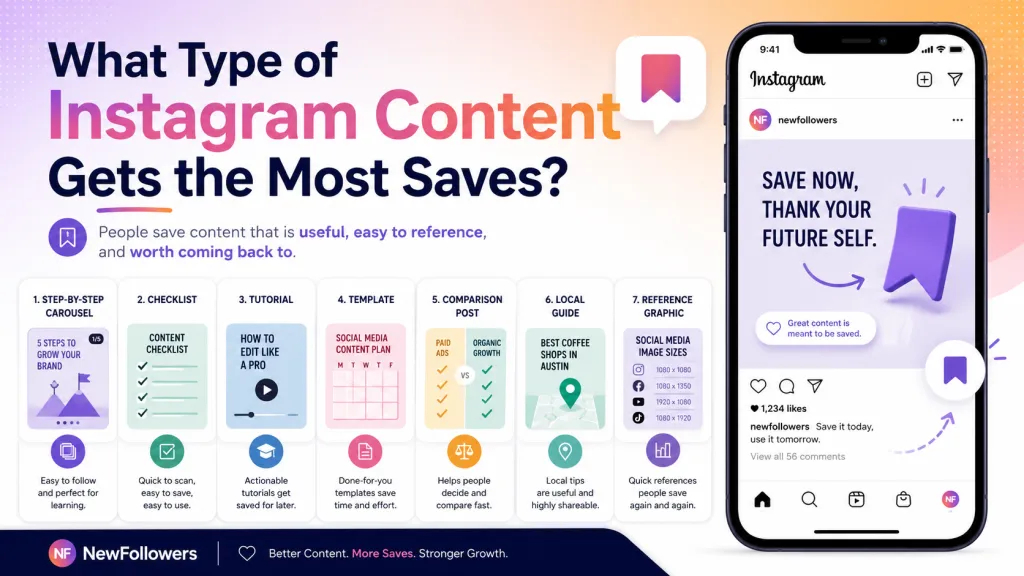
What Type of Instagram Content Gets the Most Saves?
The most saveable Instagram content is specific, reusable, organized, and difficult to remember without a reference. It gives the audience a useful resource rather than a general opinion.
How to Get More Saves on Instagram: 12 Practical Steps
1. Start With a Problem People Will Face Again
Do not begin with the format. Begin with the repeatable problem. Ask what your audience will need to remember, compare, complete, avoid, or explain in the future.
A weak topic might be "Thoughts on Instagram marketing." A stronger topic would be "Seven Instagram caption formulas for service businesses." The second idea gives the reader a practical reason to return.
2. Match the Post to Search Intent
Users save content when it answers a real question. Review your comments, direct messages, customer support requests, sales calls, search suggestions, and competitor discussions. Look for questions that begin with:
Each repeated question can become a save-worthy post.
3. Put the Outcome in the First Slide or Opening Frame
Your hook should explain what the user will gain. Avoid vague introductions such as "You need to hear this." Use a direct promise that the post can realistically deliver.
Effective examples include:
4. Use Carousels for Structured Information
Carousels work well when a topic includes stages, examples, comparisons, mistakes, or categories. Give each slide one job and arrange the information in a logical sequence.
Instagram expanded carousels to support up to 20 photos or videos, giving creators more room to develop visual guides. That does not mean every carousel should use all 20 slides. Use only the number needed to complete the promise without unnecessary repetition.
A practical carousel structure is:
5. Make Every Slide Understandable on Its Own
Users often swipe quickly, revisit only one slide, or receive screenshots from friends. Each slide should communicate a complete point without depending on a long explanation elsewhere.
Use descriptive headings, short sentences, readable text, clear contrast, and enough spacing for mobile screens. Avoid turning a carousel into a screenshot of a dense article.
6. Create Reference Content Instead of Disposable Content
Disposable content reacts to the moment. Reference content stays useful after the moment passes. Both can be part of a healthy strategy, but reference posts are more naturally aligned with saves.
Examples of reference content include glossaries, formulas, calendars, scripts, recipes, price-planning guides, packing lists, troubleshooting flows, recommended tools, measurement charts, and before-and-after processes.
7. Add Useful Specificity
General advice is easy to understand but rarely worth saving. Specificity increases practical value.
Instead of "Improve your restaurant's Instagram," create "A seven-day Instagram posting plan for independent restaurants in Miami." Instead of "Home maintenance tips," publish "A fall home maintenance checklist for homeowners in the Northeast."
Local details are especially valuable when they affect timing, weather, costs, regulations, transportation, seasonal demand, or customer behavior.
8. Use Reels That Teach a Repeatable Process
Entertainment can earn saves, but educational Reels give viewers an obvious reason to return. Demonstrate a process that is easier to follow visually than through text alone.
Use on-screen text, deliberate pacing, a clear beginning and ending, and a caption that summarizes the steps. A viewer should understand what the Reel teaches even when watching without sound. Our free Reel hook generator can help you open with a stronger promise.
9. Write Captions That Add Information
Do not repeat every word from the graphic or video. Use the caption to add context, exceptions, materials, examples, timing, or an abbreviated checklist. If captions slow you down, our caption generator is a quick starting point.
The opening lines should confirm the post's value because users may see only the beginning before tapping "more." Keep paragraphs short and make important details easy to scan.
10. Ask for a Save at the Right Moment
A save CTA works best after the content has demonstrated value. Asking users to save an empty teaser feels forced. First deliver the solution, then explain why keeping it may help.
Natural CTAs include:
11. Repurpose Successful Posts Without Duplicating Them
When a carousel performs well, convert the idea into a Reel, Story sequence, updated guide, industry-specific example, or local version. Keep the central solution but change the presentation or deepen the information.
Originality remains important. Instagram has continued to emphasize original creators and has described changes intended to give original content more opportunity in recommendations.
12. Update Older Save-Worthy Content
Audit older posts that previously generated saves. Check whether the information, examples, product features, dates, prices, tools, or local references are still accurate. Rebuild strong topics with updated details rather than reposting outdated material unchanged.
How to Calculate Your Instagram Save Rate
A practical save rate compares the number of saves with the number of accounts reached:
Save Rate = Saves ÷ Reach × 100
For example, a post with 50 saves and a reach of 5,000 has a save rate of 1%. This is an internal analysis formula rather than a universal Instagram benchmark.
Compare similar content with similar content. A tutorial carousel should not automatically be judged against a humorous Reel because the formats and audience intentions differ.
Metrics to Review With Saves
Instagram provides performance insights for posts, Stories, Reels, and live content, although available metrics and viewing periods can vary by account and content type. To put your numbers in context, try our free engagement rate calculator.
A Simple Four-Week Instagram Save Strategy
Week 1: Research Audience Problems
Collect at least 20 recurring questions from comments, customer conversations, online communities, search suggestions, and your existing content. Group them into themes such as cost, preparation, comparison, troubleshooting, and planning.
Week 2: Test Four Save-Worthy Formats
Publish a checklist, a step-by-step carousel, a tutorial Reel, and a comparison post. Keep the topics focused on similar audience segments so the results are easier to interpret.
Week 3: Improve Packaging
Review which posts earned the highest save rate. Improve the hooks, covers, slide order, caption structure, readability, and CTA. Do not change everything at once, or you will not know what influenced performance.
Week 4: Build a Repeatable Series
Turn the strongest topic into a recognizable series. Examples include "Monday Marketing Templates," "NYC Weekend Guides," "Small Business Checklists," or "One-Minute Home Repairs." A consistent series can teach followers what type of value to expect.
Common Mistakes That Reduce Instagram Saves
Publishing Advice That Is Too Broad
"Be consistent" or "create valuable content" may be true, but these statements do not give the user something practical to revisit. Explain what to do, how to do it, and when it applies.
Using a Strong Hook With a Weak Payoff
A dramatic cover may earn a swipe, but users will not save the post when the promised information is missing. Make sure the final content fully answers the opening claim.
Overloading the Design
Small fonts, long paragraphs, decorative clutter, and poor contrast reduce usability. A saveable resource should be easy to scan on a phone and easy to understand when revisited weeks later.
Hiding the Best Information
Do not force readers through unnecessary slides before delivering value. Place useful information early and maintain a logical progression.
Measuring Saves Without Context
A lower save count does not automatically mean a post failed. Entertainment, announcements, community questions, and personal stories may be designed to generate other outcomes.
Relying on Artificial Engagement
Purchased or automated activity does not replace useful content or a genuine audience relationship. Instagram has stated that it removes inauthentic likes, follows, and comments associated with third-party apps, while Meta's policies prohibit deceptive attempts to inflate viewership or engagement.
Why Include NewFollowers in Your Instagram Growth Plan?
NewFollowers can be considered as one part of a broader visibility strategy for creators and businesses that want to strengthen their social presence. Its website offers Instagram followers, likes, and views and states that orders do not require the customer's Instagram password. These are the company's own service claims and should be reviewed alongside its current terms, delivery information, refill policies, support options, and refund conditions before ordering.
Audience-growth services should not be treated as a replacement for content quality. Increasing visibility may bring more people to a profile, but those visitors will save posts only when the content is genuinely useful, relevant, and easy to revisit.
A balanced strategy connects four elements:
Before using any third-party Instagram service, review how it operates, confirm that no password is required, avoid automation that performs unauthorized actions through your account, and evaluate results using more than follower count alone.
Tips Before Changing Your Instagram Content Strategy
Instagram's Best Practices hub provides creators with guidance covering creation, engagement, reach, monetization, and platform guidelines, including personalized recommendations within the Professional Dashboard.
Final Takeaway
The most reliable way to get more saves on Instagram in 2026 is to publish content that becomes a tool. Give users a checklist they can follow, a template they can reuse, a guide they can visit, or a comparison they can consult before making a decision.
Start with a recurring audience problem, package the solution in a clear carousel or tutorial Reel, deliver the value quickly, and ask for a save only after earning it. Then measure save rate alongside reach, shares, retention, profile activity, and business outcomes.
For creators and businesses ready to strengthen their broader Instagram presence, explore the current growth options available from NewFollowers, review the service details carefully, and combine responsible visibility support with an original, save-worthy content strategy.
Frequently Asked Questions
How do I get more saves on Instagram?
Create reusable content such as checklists, tutorials, templates, comparisons, and guides. Use a clear hook and ask users to save the post after delivering value.
Do Instagram saves increase reach?
Saves are one of several engagement signals Instagram may consider. They can indicate value, but they do not guarantee greater reach by themselves.
What content gets the most Instagram saves?
Practical content generally earns saves, including step-by-step carousels, recipes, local guides, reference graphics, product comparisons, and downloadable-style templates.
Are saves more important than likes?
Neither metric is universally more important. Likes indicate immediate appreciation, while saves often indicate lasting usefulness or future intent.
How do I calculate Instagram save rate?
Divide the number of saves by accounts reached and multiply by 100. Compare the result with similar posts from your own account.
Should I ask followers to save every post?
No. Use a save CTA only when the post contains information the audience may realistically need again.
Do carousels generate more saves than Reels?
Carousels often work well for structured references, while Reels can generate saves when they demonstrate a useful process. Test both formats with comparable topics.
Can local businesses get Instagram saves?
Yes. Local guides, service checklists, event calendars, neighborhood comparisons, and seasonal recommendations can be highly saveable.
How often should I publish save-worthy content?
Choose a sustainable frequency. One detailed, useful post can be more valuable than several rushed posts with no clear purpose.
Can NewFollowers guarantee more Instagram saves?
No service can guarantee organic saves from interested users. NewFollowers may support broader profile visibility, but save growth depends primarily on content relevance and quality.
Ready to Grow Your Social Media?
Real followers, instant delivery, 30-day refill guarantee. Pick your platform: