How to Get Followers on Twitch: The Follow Comes After the Watch
How to Get Followers on Twitch
You get followers on Twitch by being watched first. A follow is something a person does after they have already arrived — from a category page, a search, a clip, a raid, or a link somewhere else entirely — so the count on your channel is the receipt for discovery rather than the cause of it.
That ordering is harder to reverse here than anywhere else, because Twitch has no surface that puts your profile in front of a stranger and lets them decide from the number. What it does publish is spread across half a dozen help pages, and a follower count appears in exactly one of them. Everything below comes from those pages, read on 22 September 2026.
What Twitch Publishes About How People Find You
Start with Discovery Analytics, because that is Twitch describing its own surfaces. It splits where your viewers came from into external sources "such as social media or video-sharing websites" and internal ones "such as go-live notifications, the Browse page, and other channels", and the Views From Twitch panel it is still testing breaks the internal side into the Browse page, homepage recommendations, other channel pages, and followers.
Each surface has its own page, and the wording on it matters.
Browse. The categories article adds one sentence that decides a great deal: "You can sort streams within a category by viewer count or by Twitch's recommendations." Two sorts, and Twitch explains neither. The same page says a streamer can add up to 10 custom tags, and that "Streams without a category are harder for viewers to find".
Search. How Does Search Work gives examples of what ranking reads — "Channel name or login", "Category of the stream", "Tags", "Stream title", "Social media username" — and adds: "Search logic may change over time without notice."
The mobile feed. Twitch does have a scrolling feed now, which most writing on this subject predates. The Discovery Feed is a live tab and a clips tab in the mobile app, and its rule is short: "All live streams and clips are automatically eligible to appear in the feed if they meet our content guidelines." Nobody uploads to it.
Clips. Featured Clips is the one page where Twitch publishes a prioritisation rule outright: discovery surfaces "default to prioritizing Featured Clips ahead of non-Featured Clips", and not featuring clips "will limit your ability to get discovered on Twitch using Clips".
Raids. Raids are mechanical rather than ranked. "A raid sends everyone connected to chat at the time of the raid to the recipient channel", and any creator can send one "regardless of Affiliate or Partner status".
Now the absence, which is the more useful half. Nothing there says how the recommendation sort orders a category page, how the feed picks what to play next, or what any signal is worth against another. Twitch gives examples for search and calls them neither complete nor stable. A page telling you what the Twitch algorithm rewards is describing something Twitch has not published.
Why the Count Sits Downstream of All of It
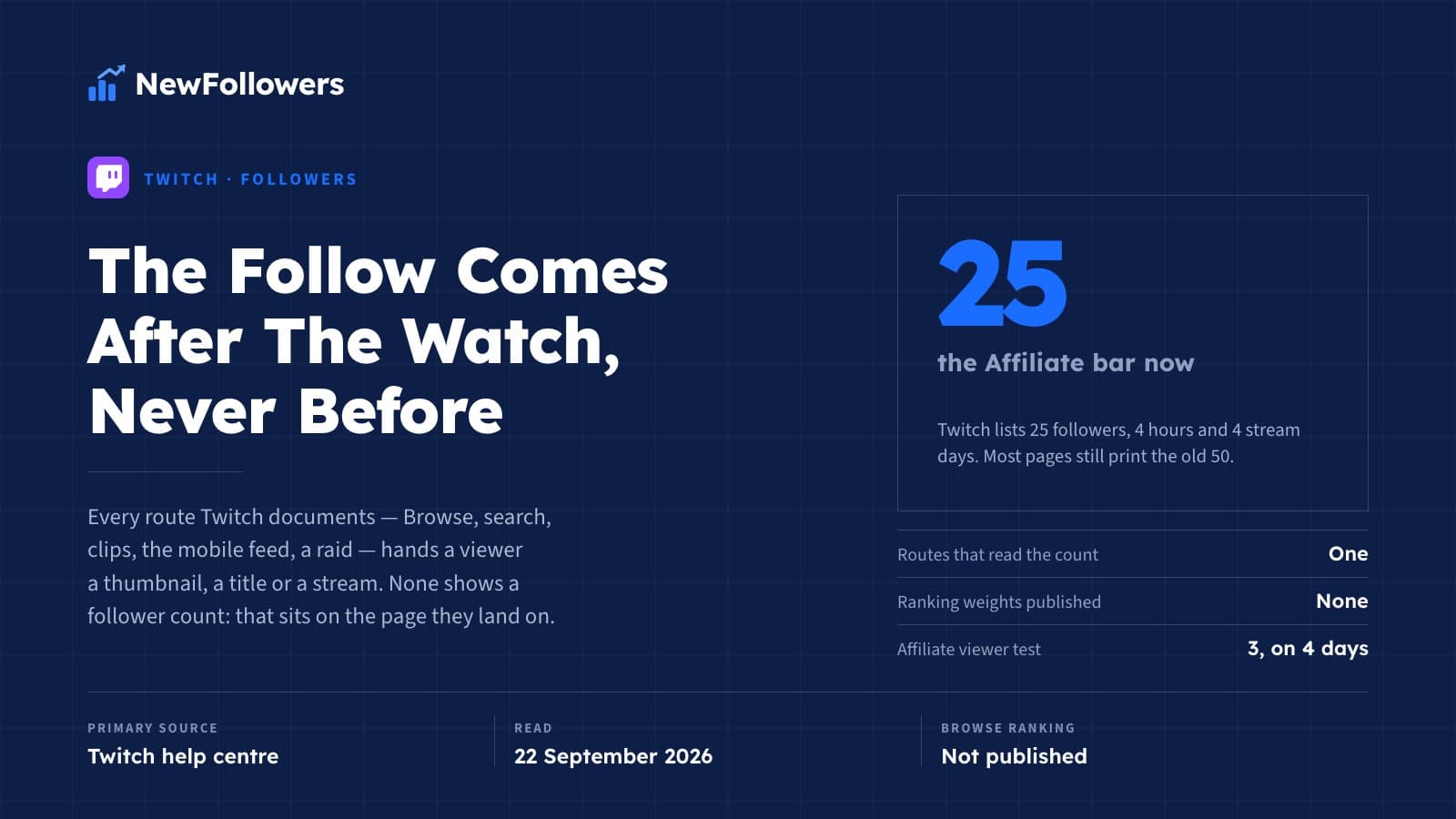
Read those five routes from the viewer's side. A category browser sees a thumbnail, a title and a viewer count. A search reads your name, category, tags and title. The feed plays video. A raid hands over somebody else's chat. In none of them has anyone seen your follower total — that lives on your channel page, and the channel page is where a viewer lands, not what they clicked.
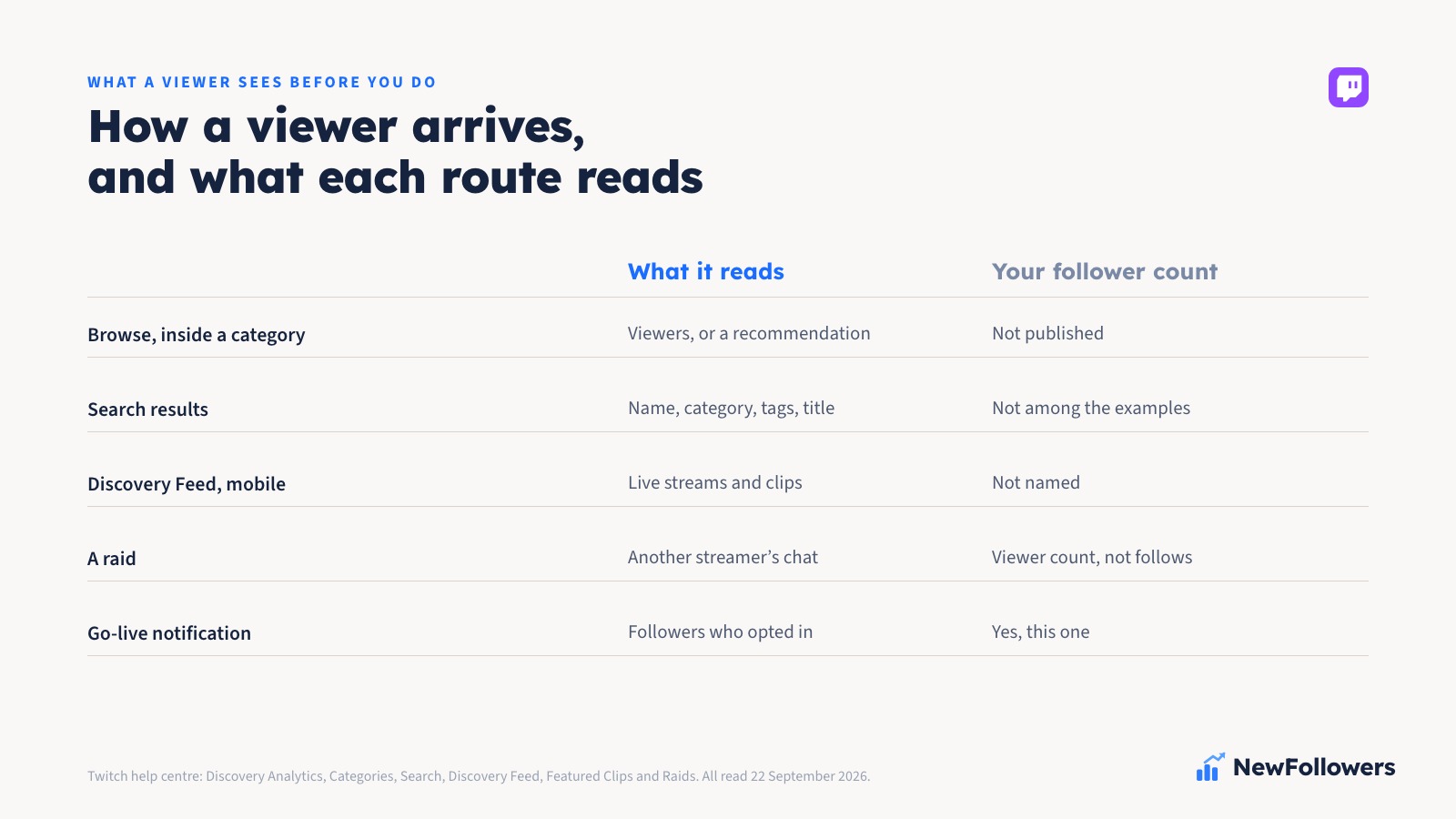
The number does get read. It gets read second, by somebody already on the page — a real thing, and a smaller one than it is usually sold as. Building it first removes nothing that stood between you and a viewer, because nothing standing there was reading it.
The One Job the Count Actually Has
Go-live notifications, and Twitch is precise about them in a way worth quoting. Its Discovery Analytics page describes the notification panel as a comparison between "notification reach (# of followers who have notifications enabled for your channel)" and "notification engagement (# followers who clicked or tapped on your go live notification)".
Three things sit inside that sentence. A follower list is a standing audience you can reach again without paying anybody. Only the part that turned notifications on counts as reach, so following and asking to be told are two decisions, not one. And only the part that clicks counts as engagement, which is why the panel is built around the gap rather than one number.
That is the published job of a follower count on Twitch, in full: permission to interrupt someone later, held by the subset who granted it. Everything else attributed to the number is inference, including the inferences that flatter a shop like this one.
The Affiliate Bar Moved, and Most Pages Still Print the Old One
Pages on this site included, which is worth conceding before the correction rather than after it.
Twitch's help article Joining the Affiliate Program and the Affiliate Program FAQ, both read on 22 September 2026, list four requirements:
The last carries its own footnote: "a minimum of 3 average viewers over any 4 stream days in the last 30 days", and "Days below 3 average viewers don't count against you." All four are measured over that same window — "For Affiliate eligibility, only the last 30 days count". Two-factor authentication is required before onboarding.
The figures still in circulation — 50 followers, 500 minutes, 7 broadcast days — were the previous bar. Check the achievement in your own dashboard rather than any article, this one included, because these numbers have already changed once.
Partner is the opposite case: Twitch publishes no checklist at all. The Partner page asks you to "Complete the Path to Partner achievement", which exists in your dashboard and nowhere public, and says completing it "does not guarantee Partnership". It adds that "viewership from hosts, raids, Reruns, Premieres, Front Page spotlight, and Subscriber Streams does not count towards Partnership consideration" — worth knowing before anyone builds a plan on raids.
What Follows From the Published Record
Four things, duller than a list of fifteen.
Be in a category, and tag the stream honestly. Twitch says a stream without a category is harder to find, names tags among the things search reads, and gives tags their own analytics panel reporting views and impressions per tag. That makes a tag a description rather than a lottery ticket, and your own panel, not a list of best tags, the place to learn which of yours did anything.
Feature a clip after every stream. The only prioritisation rule Twitch states in the open, the only route here that works while you are offline, and the one it says outright that skipping will limit.
Raid, and check that people can raid you back. Incoming raid settings can require a minimum viewer count and a minimum account age, and Twitch notes that once a minimum viewer count is set, offline channels cannot raid you at all. A streamer wondering why the raids never come has a settings page to read first.
Ask for the follow as a decision about the next stream. Nobody watching now needs to follow to keep watching. It is worth something to the person granting it only if there is a next stream they would want to be told about — the same thing the notification panel measures, from the other end.
Absent from that list: a schedule, a time of day, a category-size sweet spot, a growth curve. Any of them may work for you. None of them is Twitch's, and a habit is not a mechanism however well it works.
Where a Purchase Fits, Honestly
NewFollowers sells Twitch followers, so read this section against our interest rather than with it.
What a purchase is: 1,000 followers for $11.99, or 5,000 for $44.99, the most chosen package. Prices are in US dollars and tax may be added at checkout depending on the country you buy from. The order takes a public channel link and never a password, delivery is spread across the window shown at checkout, and a 30-day refill covers a count that drops below what was delivered.
What it is not. Twitch's Community Guidelines name this more directly than most platforms bother to. Under "Spam, Scams, and Other Malicious Conduct", the prohibited list includes "Engage in viewership tampering (such as artificially inflating follow or live viewer stats)". Follow stats, by name, in the same clause as viewer stats.
The mechanism runs against the purchase too. The count's one published job is the go-live notification, and reach there is the followers who turned notifications on — something a person decides to do. A delivered follow is not that decision. Nor can a purchase touch the requirement that actually holds people short of Affiliate, an average of three concurrent viewers across four stream days; the shortcut sold for that one is a viewer bot, it sits in the same prohibited sentence, and free Twitch viewers covers why it can end a channel rather than merely breach a rule.
So the shape is narrow. A purchase changes a number a visitor reads on your channel page after arriving by some other route. Whether a larger number changes what they do next is not published by Twitch and not something a seller can measure for you, and anybody quoting a conversion rate for social proof is quoting a figure they chose.
If the Number Has Not Moved
What Is Missing From This Page, and Why
No best time to stream, no ideal category size, no followers-per-month curve, and no account of how the Browse recommendation sort or the mobile feed orders anything — Twitch publishes none of it.
What is left is three things you can check yourself. The Affiliate follower bar is 25, not 50. The published job of a follower count is the go-live notification, held by the subset who opted into being told. And the follow arrives after the watch, on every route Twitch has documented — which makes the number the record of an audience rather than the way to get one.
The cross-platform version of the question — where the answer changes as the surface changes — is how to get followers fast.
Frequently Asked Questions
How do you get followers on Twitch?
By being watched first. A follow happens after somebody has already arrived on your channel, and every route Twitch documents for arriving — the Browse directory, search, clips, the mobile Discovery Feed and raids — hands a viewer a thumbnail, a title, a category, a viewer count or a piece of video. None of them shows your follower total, which sits on the channel page people land on rather than on the thing they clicked. What follows from Twitch's own documents is narrow: be in a category and tag the stream, feature a clip after every stream, raid and make sure your own incoming raid settings let people raid you back, and give a viewer a reason to want telling about the next stream.
Does having more followers get your Twitch stream more viewers?
Not through any mechanism Twitch has published. It gives examples of what search ranking reads — channel name, category of the stream, tags, stream title, social media username — and says the list may change without notice; it publishes nothing at all about how the Browse recommendation sort or the mobile Discovery Feed orders anything. The one published job of a follower count is the go-live notification, and Twitch's own analytics split even that into notification reach, the followers who have notifications enabled, and notification engagement, the ones who clicked or tapped.
How many followers do you need for Twitch Affiliate?
Twenty-five. Twitch's help article on joining the Affiliate Program and its Affiliate Program FAQ both list the same four requirements: reach 25 followers, stream for 4 hours, stream on 4 different days, and reach an average of 3 viewers on 4 different days, with only the last 30 days counting towards eligibility. The 50-follower figure still printed almost everywhere, including on pages of this site, is the previous bar. Since it has already moved once, check the Path to Affiliate achievement in your own Creator Dashboard rather than any article.
How do small streamers get discovered on Twitch?
Through surfaces that carry a live stream or a piece of video rather than a profile. Twitch's Discovery Analytics splits arrivals into external sources such as social and video-sharing sites and internal ones such as go-live notifications, the Browse page and other channels. Its Featured Clips page carries the only prioritisation rule Twitch publishes anywhere — discovery surfaces default to prioritising Featured Clips ahead of non-featured ones — and the mobile Discovery Feed makes all live streams and clips automatically eligible if they meet the content guidelines. Raids are the fourth route and are mechanical rather than ranked: a raid sends everyone connected to chat to the channel being raided.
Do your followers get notified when you go live on Twitch?
Only the ones who turned notifications on, and Twitch measures that gap itself. Its Discovery Analytics notification panel compares notification reach, defined as the number of followers who have notifications enabled for your channel, against notification engagement, the number of followers who clicked or tapped the go-live notification. Following and asking to be told are two separate decisions by the same person. No opt-in rate is published anywhere, so any percentage quoted for it was chosen by whoever wrote it.
Does buying Twitch followers help you grow?
It raises a number on a channel page, and NewFollowers sells them, so that is still the honest answer. Twitch's Community Guidelines prohibit viewership tampering, described as artificially inflating follow or live viewer stats, which names follow stats directly rather than by implication. A purchase also cannot reach the Affiliate requirement that actually holds people up, an average of three concurrent viewers across four stream days, and it cannot reach the count's one published job either, since notification reach counts followers who have turned notifications on and that is something a person decides to do. Whether a larger number changes what a visitor does next is not published by Twitch and not measurable by a seller.
How does the Twitch algorithm decide what to show people?
Twitch does not say, and that is the most useful fact on the subject. Its categories article says a category page can be sorted by viewer count or by Twitch's recommendations, and explains the second one nowhere. Its search article gives examples of what ranking reads and adds that search logic may change over time without notice. Its Discovery Feed article says all live streams and clips are automatically eligible if they meet the content guidelines, and the only ordering it states is that Featured Clips are prioritised in the feed ahead of non-featured ones. Any page describing weights, thresholds or a distribution funnel on Twitch is describing something Twitch has never published.
Ready to Grow Your Social Media?
Real followers, instant delivery, 30-day refill guarantee. Pick your platform: